> ## Documentation Index
> Fetch the complete documentation index at: https://docs.youware.com/llms.txt
> Use this file to discover all available pages before exploring further.
# Remix
> Copy and modify an existing project. Change content, theme, or add sections directly from the Remix popup.
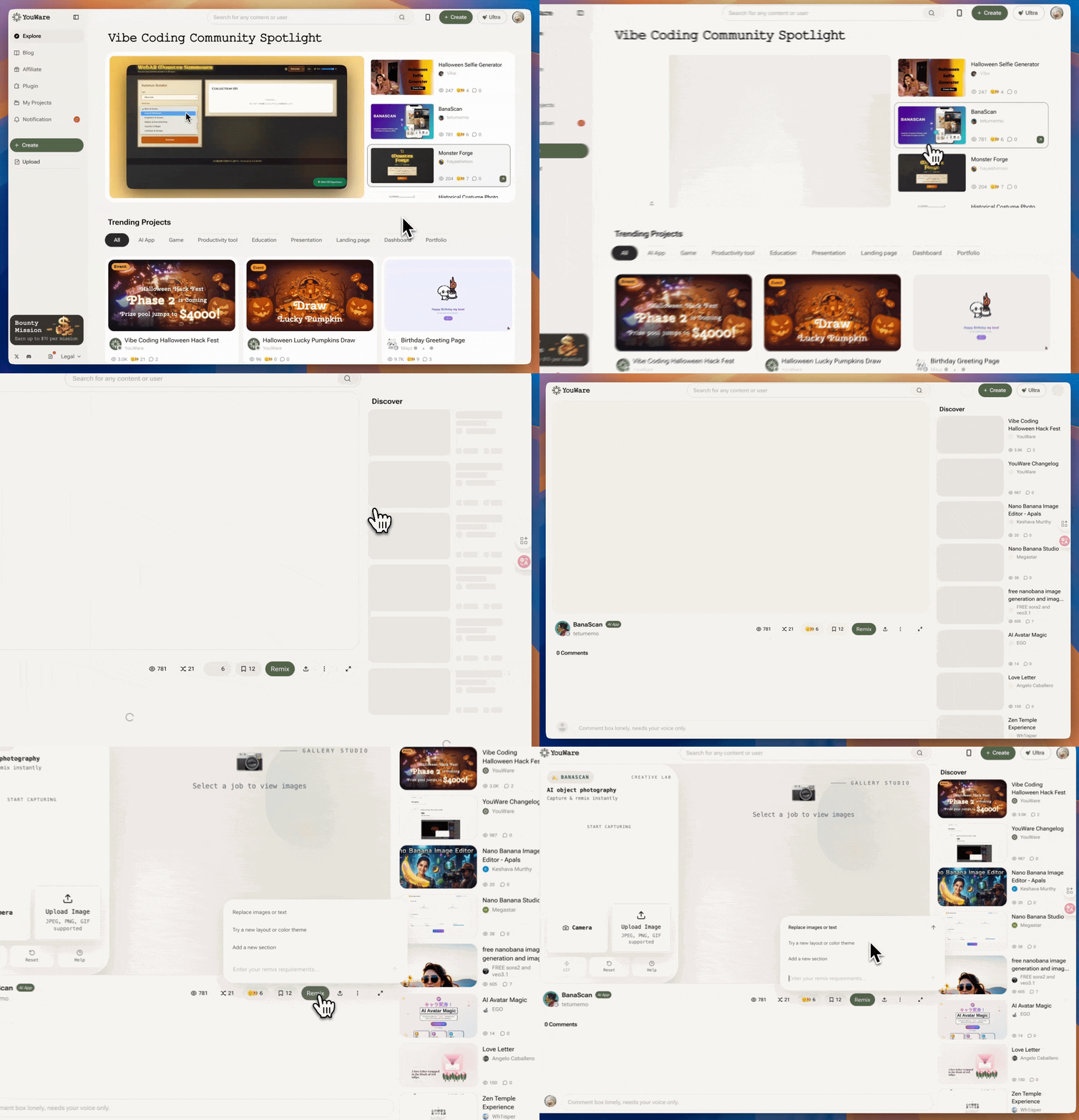
Click the **Remix** button on any project to create a copy and modify it. You can change images, text, colors, layout, and add new sections without starting from scratch.
 ## Start Remixing
1. Find a project you want to modify
2. Click the **Remix** button on the project details page
3. The Remix popup opens with modification options
4. Make your changes and click to apply
## Quick Modification Prompts
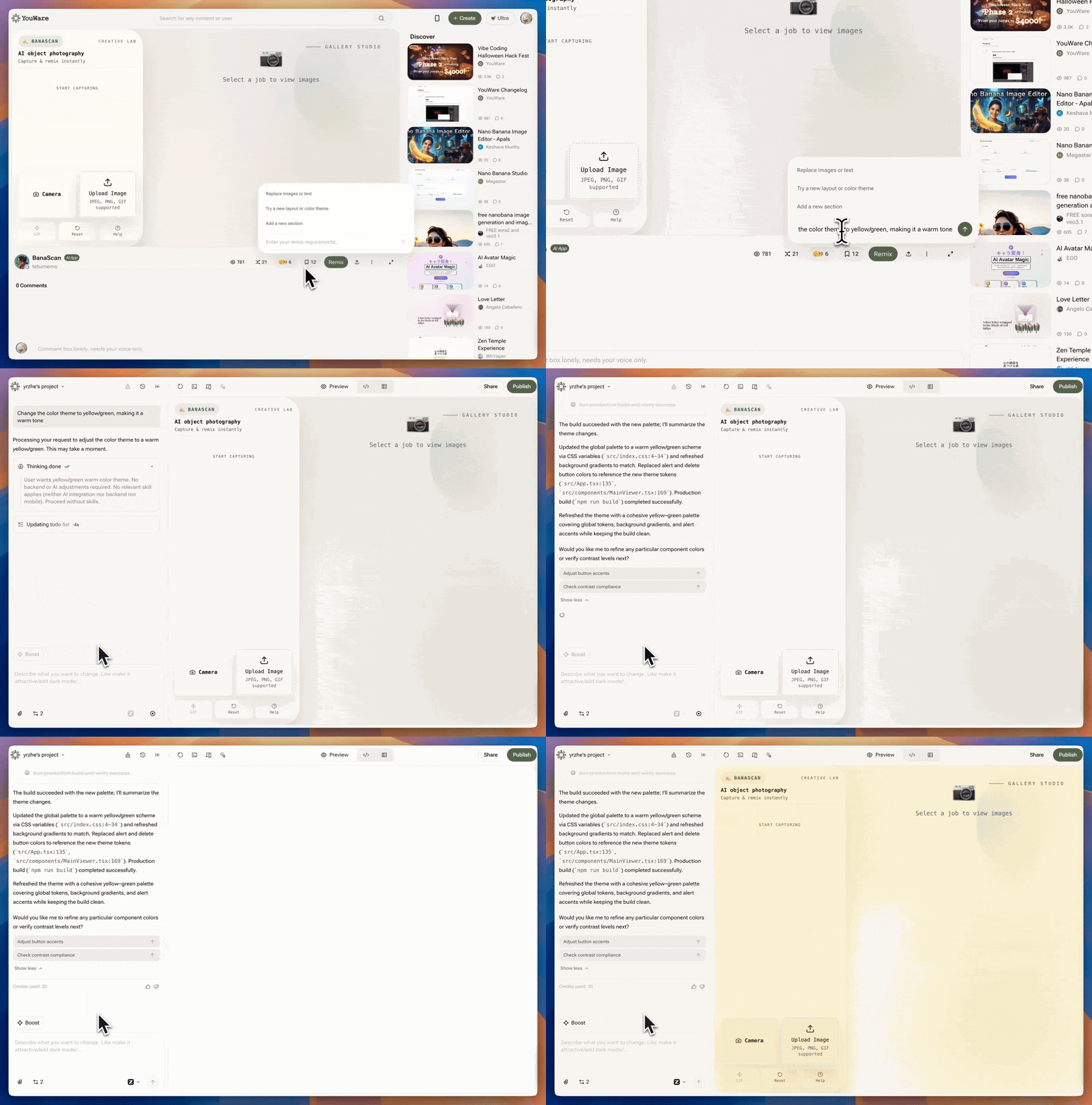
Enter what you want to change directly in the text input. Examples:
* "Replace the hero image with a video"
* "Change the color scheme to blue and white"
* "Add a pricing table"
* "Make the buttons larger"
* "Change the background to dark"
## Preset Options
For common changes, click one of these buttons:
Update images or text
Modify colors or layout
Add new components
## What Remix Saves You
* **No rebuilding**: Reuses existing code and structure
* **Lower cost**: Fewer Credits than creating from scratch
* **Faster edits**: Modify only what you need to change
## Start Remixing
1. Find a project you want to modify
2. Click the **Remix** button on the project details page
3. The Remix popup opens with modification options
4. Make your changes and click to apply
## Quick Modification Prompts
Enter what you want to change directly in the text input. Examples:
* "Replace the hero image with a video"
* "Change the color scheme to blue and white"
* "Add a pricing table"
* "Make the buttons larger"
* "Change the background to dark"
## Preset Options
For common changes, click one of these buttons:
Update images or text
Modify colors or layout
Add new components
## What Remix Saves You
* **No rebuilding**: Reuses existing code and structure
* **Lower cost**: Fewer Credits than creating from scratch
* **Faster edits**: Modify only what you need to change
 ## Frequently Asked Questions
No. When you remix a project, you create a completely independent copy. The original project remains unchanged. Your remixed version is your own separate project.
No. You can remix using natural language prompts like "Make the buttons bigger" or "Change the background color." No coding required.
Yes. You can remix any public project, including projects that were already remixed from other projects. Each remix is a new, independent copy.
Remixing itself is free. You only pay Credits when you ask the AI to make modifications to your remixed copy.
You can only remix projects that are publicly shared. Private projects cannot be remixed.
Yes. Your remixed project displays credit to the original creator and links back to the original project on the project details page.
Creating the copy is instant. Making modifications takes a few seconds depending on complexity. You can see live updates as changes are applied.
Yes. You can request new changes or edit your remix copy to revert modifications. The original project is never affected.
If a project creator has disabled the remix option (marked "Remix Permissions: Off"), you cannot remix that project. The remix button will be disabled and cannot be clicked. Only projects with remix enabled can be remixed.
No. Projects created through remix cannot be downloaded as source code. This protects the original creator's work. If you need to download code, create a project from scratch instead.
No. If remix is disabled, the project becomes read-only. Other users can view it but not modify or copy it.
No. If you allow remix, anyone can create unlimited copies from your project.
Yes. Remixed projects link back to the original, so you can see remixes in your Creator Studio analytics.
## Frequently Asked Questions
No. When you remix a project, you create a completely independent copy. The original project remains unchanged. Your remixed version is your own separate project.
No. You can remix using natural language prompts like "Make the buttons bigger" or "Change the background color." No coding required.
Yes. You can remix any public project, including projects that were already remixed from other projects. Each remix is a new, independent copy.
Remixing itself is free. You only pay Credits when you ask the AI to make modifications to your remixed copy.
You can only remix projects that are publicly shared. Private projects cannot be remixed.
Yes. Your remixed project displays credit to the original creator and links back to the original project on the project details page.
Creating the copy is instant. Making modifications takes a few seconds depending on complexity. You can see live updates as changes are applied.
Yes. You can request new changes or edit your remix copy to revert modifications. The original project is never affected.
If a project creator has disabled the remix option (marked "Remix Permissions: Off"), you cannot remix that project. The remix button will be disabled and cannot be clicked. Only projects with remix enabled can be remixed.
No. Projects created through remix cannot be downloaded as source code. This protects the original creator's work. If you need to download code, create a project from scratch instead.
No. If remix is disabled, the project becomes read-only. Other users can view it but not modify or copy it.
No. If you allow remix, anyone can create unlimited copies from your project.
Yes. Remixed projects link back to the original, so you can see remixes in your Creator Studio analytics.