> ## Documentation Index
> Fetch the complete documentation index at: https://docs.youware.com/llms.txt
> Use this file to discover all available pages before exploring further.
# History - Rewind Any Change
> Made a mistake? No problem. History lets you jump back to any version of your project instantly—no stress, no lost work.
**Undo on steroids.**
Every change you make is saved automatically. Rewind to any version anytime—your work is always safe.
## Why History Matters
You're building. Experimenting. Trying bold ideas.
Then something breaks. Or you realize the version from 10 minutes ago was actually better.
**History has your back.** Every edit, every AI generation, every tweak—automatically saved as a new version. You can jump back to any moment with one click.
No lost work. No panic. Just confidence.
## How It Works
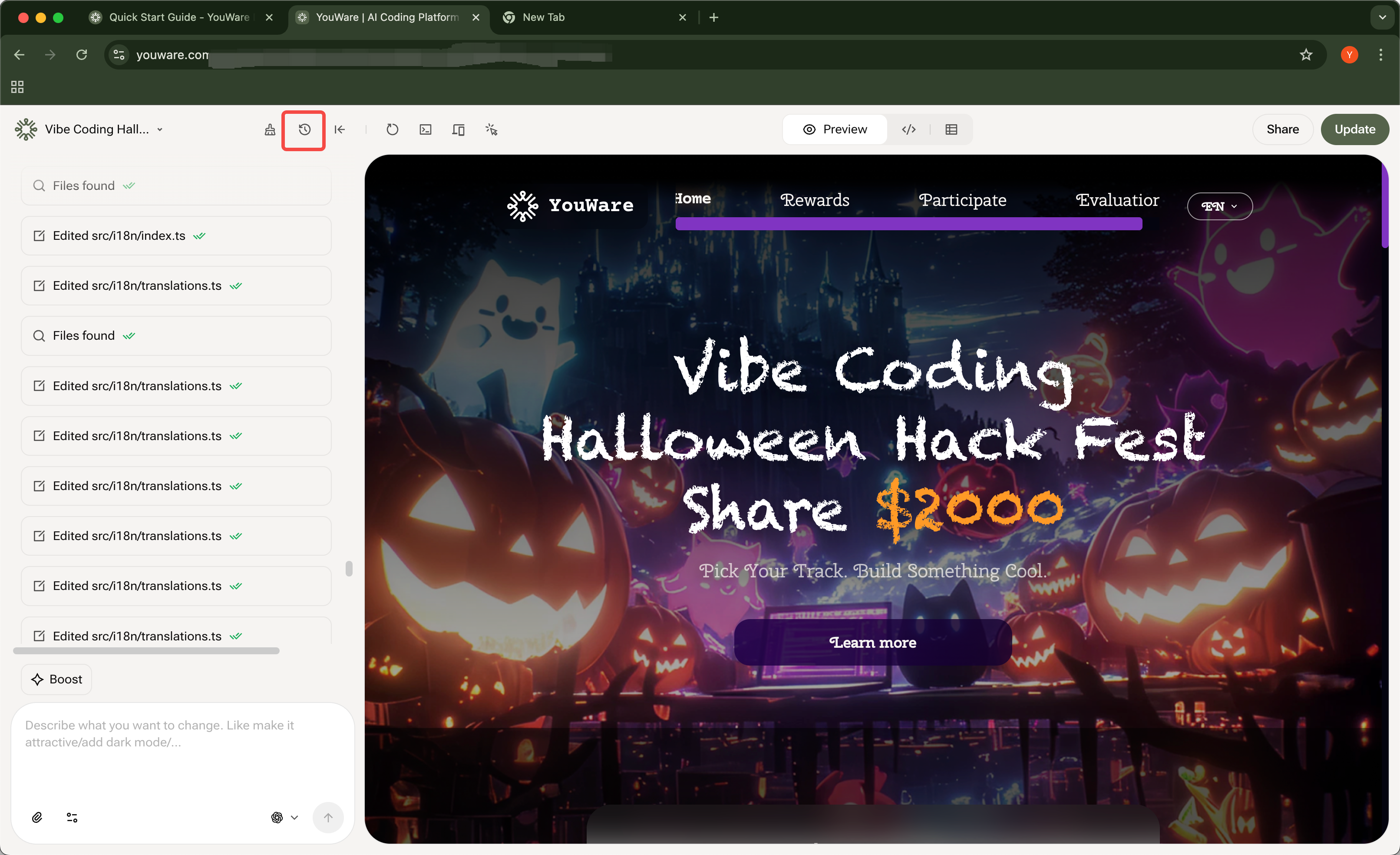 Click the **History icon** in the top toolbar (looks like a clock).
See your project's timeline. Each version shows what changed and when.
Click a version to preview it instantly. See exactly what your project looked like at that moment.
Found the version you want? Click **Restore this version**. Done.
**Important: Restoring is permanent.**
Once you restore a version, **all versions after it are gone**. You won't be able to access anything that happened after that point.
Example: If you restore Version 20, you lose Versions 21, 22, 23, and everything after.
**Credits are not refunded** when you restore. Use [Credit Care](/introduction/youware-credit-care) if you want to refund credits from a failed attempt.
Preview carefully before restoring. Make sure it's the exact version you want—there's no undo for this action.
## When to Use History
AI went in the wrong direction? Rewind to before it happened.
Preview multiple versions side-by-side to pick the best one.
Accidentally deleted something? Find the version before the mistake.
Try wild ideas. If they don't work, just rewind. Zero risk.
## What Gets Saved
Every version captures:
* All code changes
* Visual edits you made
* AI-generated updates
* Manual file edits
Each version includes:
* **Description** — What changed
* **Timestamp** — Exactly when it happened
* **Full snapshot** — Complete state of your project
## Pro Tips
You don't need to do anything. Every time you make a change or the AI generates something, a new version is created instantly.
Your history stays forever. Come back weeks later and find any version.
**Critical:** Preview the version first. Once you restore, everything after that version is permanently lost. There's no undo.
Restoring doesn't refund credits. If you want to recover credits from a failed attempt, use [Credit Care](/introduction/youware-credit-care) to rewind AND get your credits back.
***
## Build Without Fear
History means you can try anything. Break things. Go bold. Experiment freely.
Because you can always rewind.
**Your safety net is always on.** Every version is saved. Every change is reversible. Create fearlessly.
***
**Need help?**
Can't find a specific version? Contact support—we can help you locate it.
Click the **History icon** in the top toolbar (looks like a clock).
See your project's timeline. Each version shows what changed and when.
Click a version to preview it instantly. See exactly what your project looked like at that moment.
Found the version you want? Click **Restore this version**. Done.
**Important: Restoring is permanent.**
Once you restore a version, **all versions after it are gone**. You won't be able to access anything that happened after that point.
Example: If you restore Version 20, you lose Versions 21, 22, 23, and everything after.
**Credits are not refunded** when you restore. Use [Credit Care](/introduction/youware-credit-care) if you want to refund credits from a failed attempt.
Preview carefully before restoring. Make sure it's the exact version you want—there's no undo for this action.
## When to Use History
AI went in the wrong direction? Rewind to before it happened.
Preview multiple versions side-by-side to pick the best one.
Accidentally deleted something? Find the version before the mistake.
Try wild ideas. If they don't work, just rewind. Zero risk.
## What Gets Saved
Every version captures:
* All code changes
* Visual edits you made
* AI-generated updates
* Manual file edits
Each version includes:
* **Description** — What changed
* **Timestamp** — Exactly when it happened
* **Full snapshot** — Complete state of your project
## Pro Tips
You don't need to do anything. Every time you make a change or the AI generates something, a new version is created instantly.
Your history stays forever. Come back weeks later and find any version.
**Critical:** Preview the version first. Once you restore, everything after that version is permanently lost. There's no undo.
Restoring doesn't refund credits. If you want to recover credits from a failed attempt, use [Credit Care](/introduction/youware-credit-care) to rewind AND get your credits back.
***
## Build Without Fear
History means you can try anything. Break things. Go bold. Experiment freely.
Because you can always rewind.
**Your safety net is always on.** Every version is saved. Every change is reversible. Create fearlessly.
***
**Need help?**
Can't find a specific version? Contact support—we can help you locate it.