> ## Documentation Index
> Fetch the complete documentation index at: https://docs.youware.com/llms.txt
> Use this file to discover all available pages before exploring further.
# Boost
> Intelligent AI assistant that automatically analyzes and optimizes your web pages with a single click, enhancing layout, content, and user experience while preserving your original design.
Boost is an intelligent polishing assistant for web pages. With just one click, the Agent automatically analyzes your page and executes optimizations to give your work a fresh new look.
## Getting Started
In the input area at the bottom of the project editing page, you'll find the **Boost button**. After clicking it, the Agent begins comprehensive analysis of your current webpage.
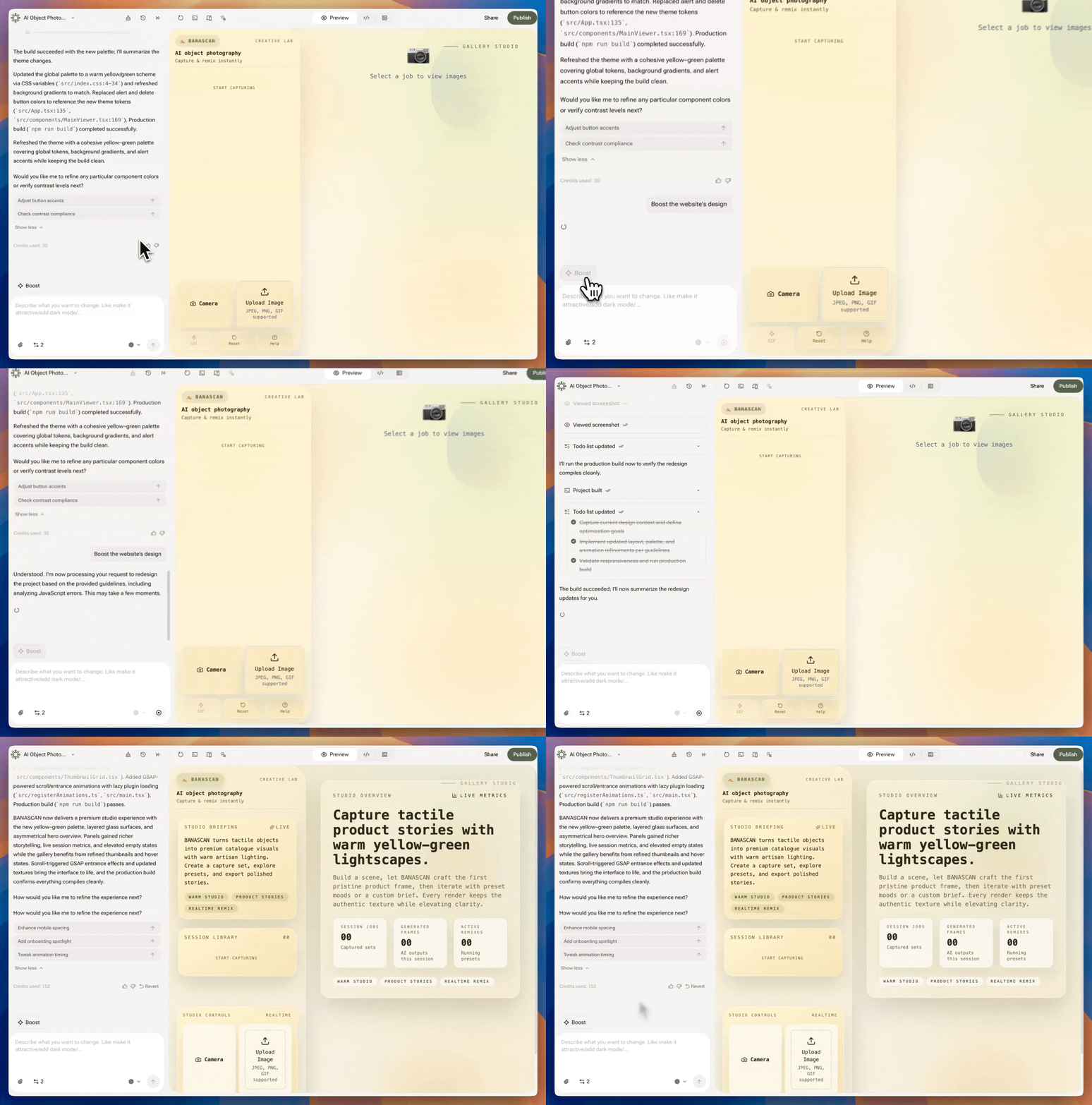 ## How Boost Analyzes Your Page
When you click Boost, the AI performs an in-depth examination across three key areas:
### Analysis Areas
* **Page Structure** - Examines page structure and visual hierarchy
* **Content Quality** - Analyzes text quality and information flow
* **User Experience** - Reviews user experience and interface elements
## The Enhancement Process
Simply click the Boost button in your project editor
System automatically analyzes layout, content, and interactions
Enhancements applied while preserving your original design intent
See your improved page immediately with no additional work required
The optimization process is **fully automated** - no additional commands or prompts needed. Just one click for comprehensive page enhancement.
## Design Philosophy
Boost doesn't redesign your website. Instead, it **intelligently enhances while preserving the original intent**, elevating project quality while maintaining your creative style.
## Key Benefits
No complex setup or configuration required. Click and watch your page improve instantly.
AI-powered analysis considers layout patterns, content flow, and user interaction optimization.
Maintains your original creative vision while enhancing quality and polish.
Addresses multiple aspects of page quality in a single optimization cycle.
## Best Practices
### Before Using Boost
* Ensure your page has basic content structure
* Save your work before optimization
* Have a clear design direction in mind
### After Boost Enhancement
* Review the optimized changes
* Test functionality and interactions
* Make minor adjustments if needed
## How Boost Analyzes Your Page
When you click Boost, the AI performs an in-depth examination across three key areas:
### Analysis Areas
* **Page Structure** - Examines page structure and visual hierarchy
* **Content Quality** - Analyzes text quality and information flow
* **User Experience** - Reviews user experience and interface elements
## The Enhancement Process
Simply click the Boost button in your project editor
System automatically analyzes layout, content, and interactions
Enhancements applied while preserving your original design intent
See your improved page immediately with no additional work required
The optimization process is **fully automated** - no additional commands or prompts needed. Just one click for comprehensive page enhancement.
## Design Philosophy
Boost doesn't redesign your website. Instead, it **intelligently enhances while preserving the original intent**, elevating project quality while maintaining your creative style.
## Key Benefits
No complex setup or configuration required. Click and watch your page improve instantly.
AI-powered analysis considers layout patterns, content flow, and user interaction optimization.
Maintains your original creative vision while enhancing quality and polish.
Addresses multiple aspects of page quality in a single optimization cycle.
## Best Practices
### Before Using Boost
* Ensure your page has basic content structure
* Save your work before optimization
* Have a clear design direction in mind
### After Boost Enhancement
* Review the optimized changes
* Test functionality and interactions
* Make minor adjustments if needed