> ## Documentation Index
> Fetch the complete documentation index at: https://docs.youware.com/llms.txt
> Use this file to discover all available pages before exploring further.
# Supabase Connection
> Connect your Supabase backend to power AI-generated, data-aware applications with real-time database connectivity and full-stack cohesion.
 ## What is the Supabase Tool?
The Supabase tool connects your YouWare project to your Supabase backend—an open-source alternative to Firebase. This connection enables the AI to use your existing data as a source of truth, reading your Supabase tables and functions to understand your data model and generate code that interacts correctly with your database.
**Key Points:**
* **Purpose**: Connects YouWare to your Supabase database and backend services
* **Function**: Allows the AI to read your data schema and use your data as context for code and content generation
* **Benefit**: Enables the AI to build data-aware applications with real-time database connectivity
* **Data Source**: Transforms your Supabase repository data into valuable context for the AI
## Key Benefits
AI generates interfaces with full knowledge of your data structure | Schema-aware | Schema-aware | Schema-aware
Build data-driven features in minutes instead of days | Quick setup | Quick setup | Quick setup
Frontend and backend work as one seamless unit | Unified architecture | Unified architecture | Unified architecture
## How to Get Your Supabase Access Key for MCP
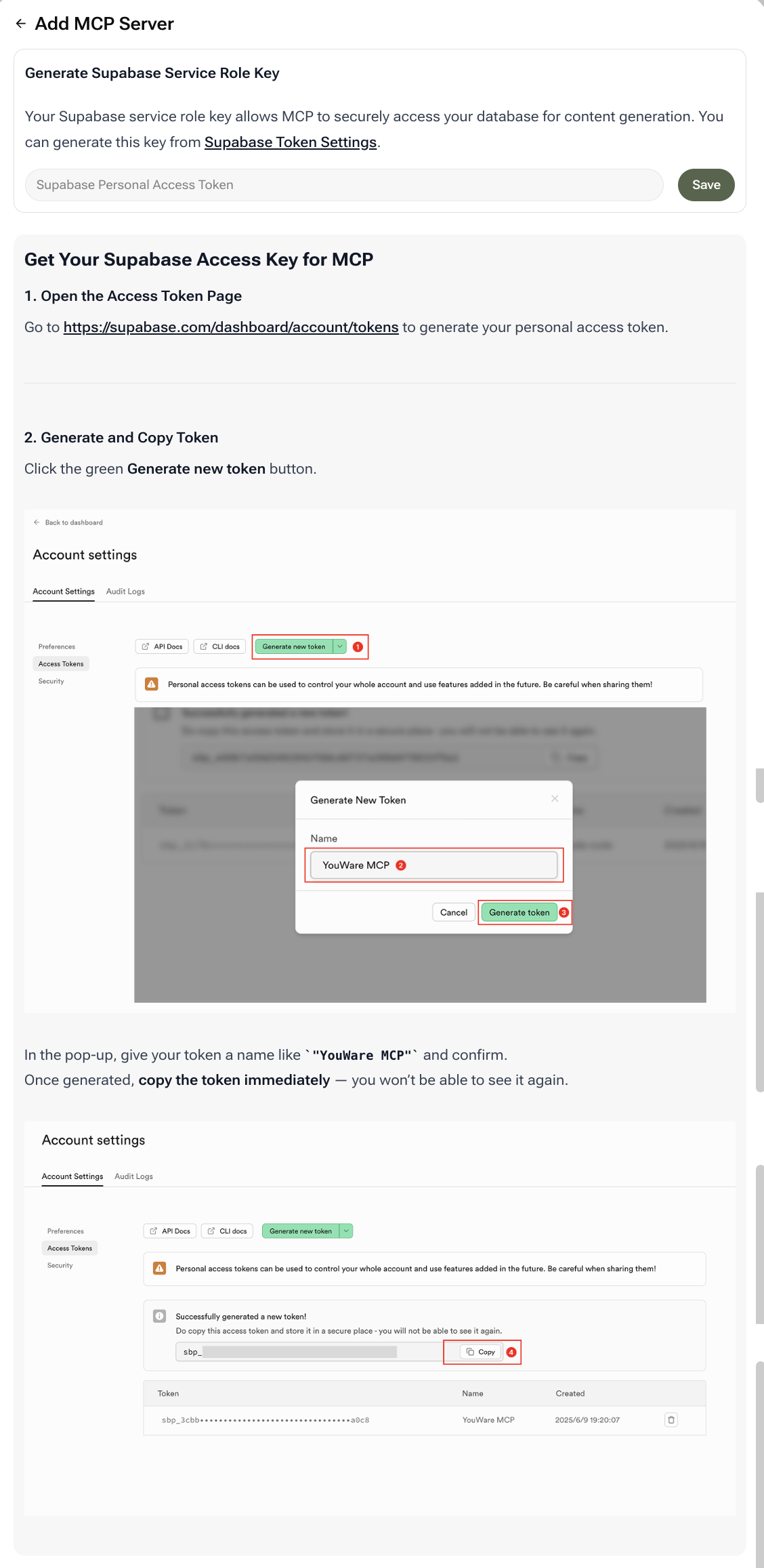
To connect Supabase, you need to generate a Service Role Key that allows YouWare's MCP to securely access your database for content generation.
Go to the [Supabase Token Settings page](https://supabase.com/dashboard/account/tokens) to generate your personal access token.
* Click the green **Generate new token** button
* In the pop-up, give your token a name like `YouWare MCP` and confirm
* Once generated, **copy the token immediately** — you won't be able to see it again
Keep your Service Role Key secure. It provides elevated access to your database and should never be exposed in client-side code.
When connecting in YouWare, use this generated token as your Supabase Service Role Key. This grants the necessary read access for the AI to understand your data model.
Your Supabase integration is now ready to use with YouWare's AI-powered development tools.
## Real-World Use Cases
**Scenario**: Developing a custom analytics dashboard to display user engagement data tracked in Supabase to your audience or sponsors
**How It Helps**: YouWare's AI reads your existing Supabase schema and instantly generates front-end code with the correct API calls to query and display your live data. This full-stack cohesion turns raw data into beautiful, functional insights
**Scenario**: Creating a real-time inventory tracker for a pop-up shop that lets your team quickly check and update inventory levels during busy events
**How It Helps**: The AI uses the Supabase connection to generate a secure, data-aware application with forms and tables that talk directly to your database—ensuring zero-latency data management and preventing costly stock errors
## FAQ
The Service Role Key has elevated privileges and bypasses Row Level Security (RLS), making it suitable for server-side operations. The Anon Key is safe for client-side use but respects RLS policies.
Yes, when properly configured. Always keep your Service Role Key private and implement appropriate RLS policies in Supabase to control data access.
The AI can generate code that writes to your database, but the actual write operations depend on the permissions granted by your Service Role Key and your Supabase security policies.
Yes, the AI can read and understand your Edge Functions to generate code that properly integrates with your serverless backend logic.
## What is the Supabase Tool?
The Supabase tool connects your YouWare project to your Supabase backend—an open-source alternative to Firebase. This connection enables the AI to use your existing data as a source of truth, reading your Supabase tables and functions to understand your data model and generate code that interacts correctly with your database.
**Key Points:**
* **Purpose**: Connects YouWare to your Supabase database and backend services
* **Function**: Allows the AI to read your data schema and use your data as context for code and content generation
* **Benefit**: Enables the AI to build data-aware applications with real-time database connectivity
* **Data Source**: Transforms your Supabase repository data into valuable context for the AI
## Key Benefits
AI generates interfaces with full knowledge of your data structure | Schema-aware | Schema-aware | Schema-aware
Build data-driven features in minutes instead of days | Quick setup | Quick setup | Quick setup
Frontend and backend work as one seamless unit | Unified architecture | Unified architecture | Unified architecture
## How to Get Your Supabase Access Key for MCP
To connect Supabase, you need to generate a Service Role Key that allows YouWare's MCP to securely access your database for content generation.
Go to the [Supabase Token Settings page](https://supabase.com/dashboard/account/tokens) to generate your personal access token.
* Click the green **Generate new token** button
* In the pop-up, give your token a name like `YouWare MCP` and confirm
* Once generated, **copy the token immediately** — you won't be able to see it again
Keep your Service Role Key secure. It provides elevated access to your database and should never be exposed in client-side code.
When connecting in YouWare, use this generated token as your Supabase Service Role Key. This grants the necessary read access for the AI to understand your data model.
Your Supabase integration is now ready to use with YouWare's AI-powered development tools.
## Real-World Use Cases
**Scenario**: Developing a custom analytics dashboard to display user engagement data tracked in Supabase to your audience or sponsors
**How It Helps**: YouWare's AI reads your existing Supabase schema and instantly generates front-end code with the correct API calls to query and display your live data. This full-stack cohesion turns raw data into beautiful, functional insights
**Scenario**: Creating a real-time inventory tracker for a pop-up shop that lets your team quickly check and update inventory levels during busy events
**How It Helps**: The AI uses the Supabase connection to generate a secure, data-aware application with forms and tables that talk directly to your database—ensuring zero-latency data management and preventing costly stock errors
## FAQ
The Service Role Key has elevated privileges and bypasses Row Level Security (RLS), making it suitable for server-side operations. The Anon Key is safe for client-side use but respects RLS policies.
Yes, when properly configured. Always keep your Service Role Key private and implement appropriate RLS policies in Supabase to control data access.
The AI can generate code that writes to your database, but the actual write operations depend on the permissions granted by your Service Role Key and your Supabase security policies.
Yes, the AI can read and understand your Edge Functions to generate code that properly integrates with your serverless backend logic.