> ## Documentation Index
> Fetch the complete documentation index at: https://docs.youware.com/llms.txt
> Use this file to discover all available pages before exploring further.
# GitHub Connection for AI-Powered Code Generation
> Connect YouWare to GitHub repositories for version control, collaboration, and intelligent code generation with full repository context.
## Understanding the GitHub Connection Tool
The GitHub connection links your YouWare project to a GitHub repository, providing version control, collaboration features, and secure code backup. The AI can read your existing code to understand your project's structure, tech stack, and coding style, ensuring seamlessly integrated code generation.
Track every change with full rollback capability and GitHub workflows
AI reads your codebase to understand structure, tech stack, and coding style
Work seamlessly with developers using Pull Requests and Issues
## Generate Your GitHub Personal Access Token for MCP Connection
To connect GitHub, you need a Personal Access Token (PAT). Follow the visual guide below to create your token:
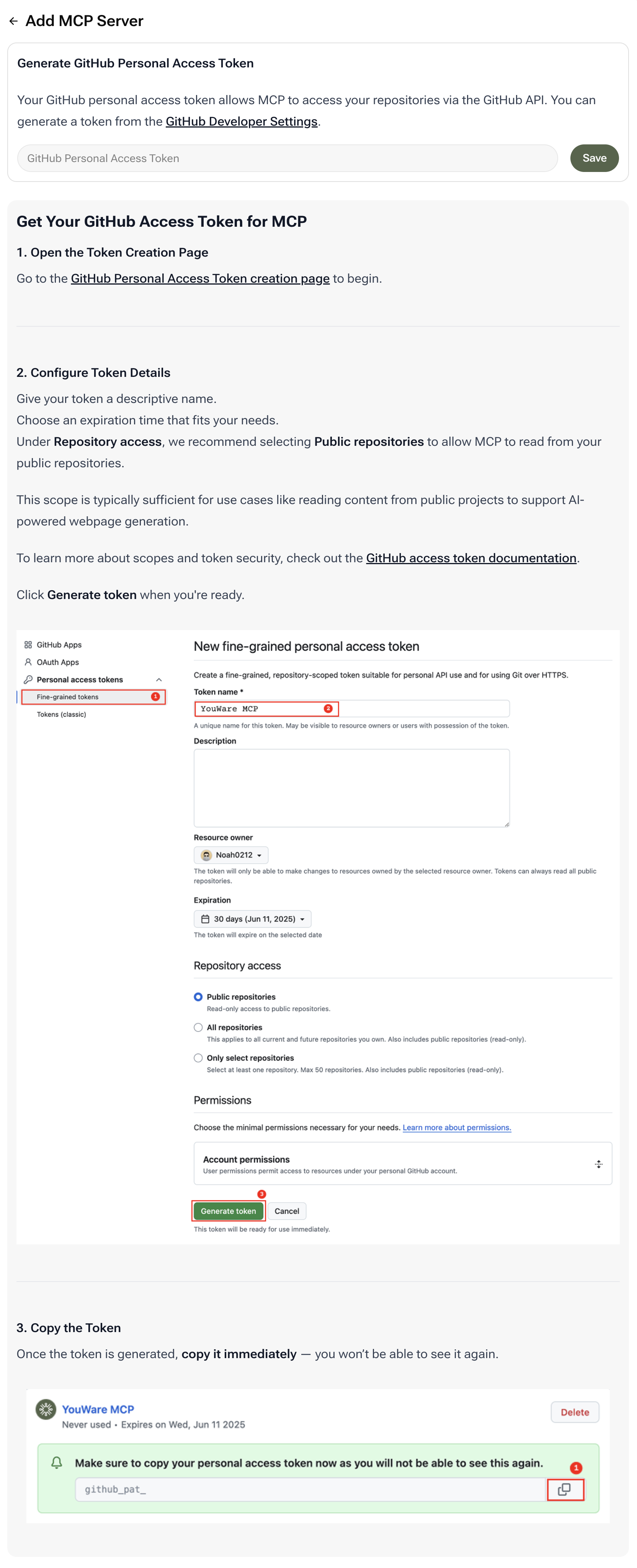 ### Key Configuration Points
**Token Name**: Use a descriptive name like `YouWare MCP` to easily identify this token later
**Repository Access**: Select **Public repositories** for basic access. This allows MCP to read from your public repositories, which is typically sufficient for AI-powered webpage generation
**Expiration**: Choose an expiration time that fits your workflow. Shorter expiration times are more secure
**Critical**: Copy your personal access token immediately after generation—you won't be able to see it again! Store it securely and never share it publicly or commit it to version control.
Need more details? Visit the [GitHub Personal Access Token creation page](https://github.com/settings/tokens/new) to get started.
## Real-World Use Cases
**Scenario**: Maintaining a public open-source library with auto-generated documentation that stays in sync with code changes
**How It Helps**: The AI reads your GitHub repository to understand code structure and generates the documentation site. With each new version push, the AI automatically updates docs—ensuring zero documentation drift.
**Scenario**: Enforcing code standards across a distributed development team
**How It Helps**: The AI reads your existing GitHub codebase to learn your style, ensuring all new components and features are perfectly consistent. This tech-driven consistency saves countless hours in code review and refactoring.
## Frequently Asked Questions
For basic read access to public repositories, minimal permissions are sufficient. For private repositories or write access, you'll need to grant additional scopes.
Yes. The token is used only to read repository data via GitHub's secure API. Always keep your token private and never share it publicly.
Absolutely. You can revoke or regenerate tokens at any time from your GitHub settings.
Yes, but you'll need to configure the token with appropriate permissions for private repository access.
### Key Configuration Points
**Token Name**: Use a descriptive name like `YouWare MCP` to easily identify this token later
**Repository Access**: Select **Public repositories** for basic access. This allows MCP to read from your public repositories, which is typically sufficient for AI-powered webpage generation
**Expiration**: Choose an expiration time that fits your workflow. Shorter expiration times are more secure
**Critical**: Copy your personal access token immediately after generation—you won't be able to see it again! Store it securely and never share it publicly or commit it to version control.
Need more details? Visit the [GitHub Personal Access Token creation page](https://github.com/settings/tokens/new) to get started.
## Real-World Use Cases
**Scenario**: Maintaining a public open-source library with auto-generated documentation that stays in sync with code changes
**How It Helps**: The AI reads your GitHub repository to understand code structure and generates the documentation site. With each new version push, the AI automatically updates docs—ensuring zero documentation drift.
**Scenario**: Enforcing code standards across a distributed development team
**How It Helps**: The AI reads your existing GitHub codebase to learn your style, ensuring all new components and features are perfectly consistent. This tech-driven consistency saves countless hours in code review and refactoring.
## Frequently Asked Questions
For basic read access to public repositories, minimal permissions are sufficient. For private repositories or write access, you'll need to grant additional scopes.
Yes. The token is used only to read repository data via GitHub's secure API. Always keep your token private and never share it publicly.
Absolutely. You can revoke or regenerate tokens at any time from your GitHub settings.
Yes, but you'll need to configure the token with appropriate permissions for private repository access.